This one started with a screenshot in Discord. Ocky, one of our regulars, shared a progress chart his tribe had put together for a long catapult and gate route: a column of system names joined by dashed and solid connectors, with a colour legend for completed, in progress and planned. Hand-built, outside the game, outside EF-Map. I am deliberately not reposting it here, because a chart like that tells everyone exactly where a tribe is building. But the moment I saw it I knew we had a gap.
A screenshot doing real work
The chart was genuinely good information design. Anyone in that tribe could glance at it and know the state of the whole route: which links were live, which one the haulers were feeding, which were still on paper. That is exactly the shared picture a tribe needs when a build spans a dozen systems and weeks of hauling.
But it had two problems that were not the author's fault. It was hand-maintained, so every status change meant editing an image and reposting it. And it was a list, not a map: no spatial orientation, no sense of where the route actually runs through EVE Frontier, no way to click a system and go look at it.
EF-Map already had almost everything needed to do this properly. The user overlay gives every player bookmarks on the 3D map, and tribe marks let one person maintain a set everyone in the tribe sees. What bookmarks could not do was express a connection between two systems. They were points. Routes are lines.
Bookmarks that know about infrastructure
So bookmarks grew links. When you add a mark you can now declare that this system hosts a catapult or a gate, pick the destination system, and set a build status: planned, in progress, or built.
The map draws the rest. Catapults render as dashed arcs with a direction arrow at the midpoint, and an out-link and its return link bow to opposite sides so they never overlap. Gates render as solid lines. Colour is status: green for built, orange for in progress, grey for planned. Select a folder in the overlay panel and you see just that route, drawn through the actual stars it crosses. The hand-made chart, but live, spatial, and clickable.
One implementation detail worth sharing for the other tool builders. The link is serialised into the mark's note field as a human-readable line, the same trick our orbital-zone tags already used. That meant zero server or schema changes: personal marks and encrypted tribe marks both carried links from the first deploy, and any client that predates the feature just shows a sensible line of text instead of breaking.
From Yeet Planner to a tracked build
Declaring links one bookmark at a time works, but if you have a computer you should let it do the typing. The Yeet Planner already calculates catapult and gate routes across EVE Frontier, including full gate corridors with their construction access plans. It knows every link in the plan. So its results now include a Save to bookmarks button.
One click creates a dated folder, something like Yeet 13/07, and files a link mark for every planned build: each catapult hop, each gate pair, all at planned status. Hops that ride existing stargates are correctly left out, because there is nothing to build there.
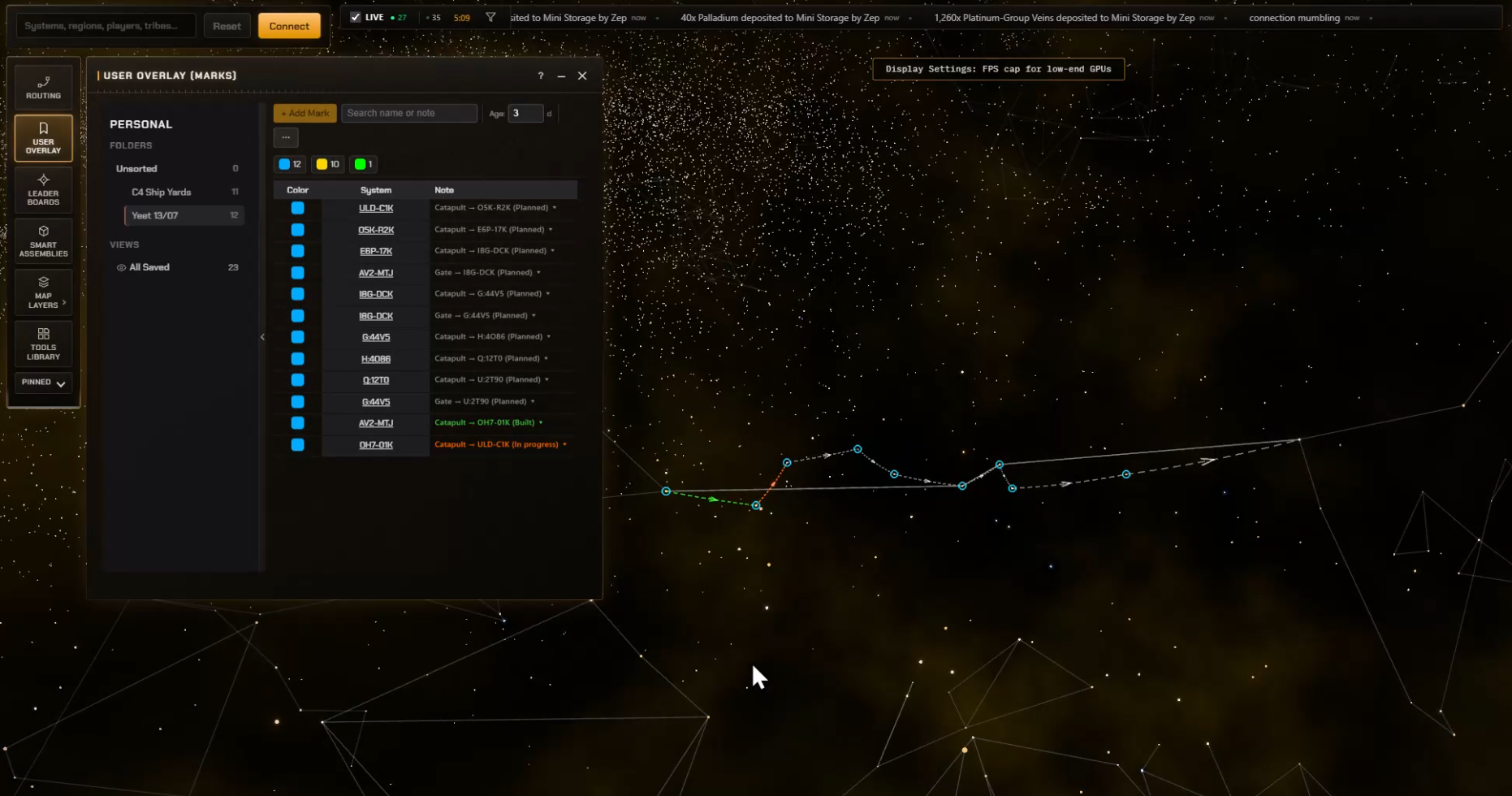
From there the folder is the build tracker. As construction progresses, click a link's status badge in the list and move it to in progress or built. The map recolours as you go. The free-text note stays yours too, so a mark can say which moon the catapult sits at or what materials the site still needs, and that note shows in the hover label on the map.
Share the folder, not twenty bookmarks
A route plan is a tribe project, so sharing it one bookmark at a time was never going to survive contact with a real sixteen-jump plan. Right-click a personal folder and there is now Share Folder to Tribe. It creates a matching tribe folder and copies every mark into it in a single operation. From that point the whole tribe sees the route on their maps, and anyone can update a status as the build moves.
Friction you only find by using it
The first working version of bookmark links went from idea to production in about three hours. Almost everything after that came from actually using it and hitting the small stuff. Editing a note used to risk mangling the link data, so the editor now keeps the two separate and recombines them on save. Deleting a plan's folder used to strand all its marks in Unsorted, so the delete dialog now offers to take the contents with it. Setting a destination by right-click used to always bounce you to point-to-point routing, so it now respects the Yeet Planner when that tab is open. And the original direction cue on catapult arcs, a subtle brightness ramp, turned out to be invisible in practice and became a proper arrowhead.
None of those were blockers. All of them were the difference between a feature you can use and a feature you want to use.
See it in motion
Fifty-five seconds, the whole flow: calculate a catapult and gate route in the Yeet Planner, save it to bookmarks, open the user overlay, and mark one link built and another in progress.
Try it
Live now on ef-map.com. Right-click any system and Add Mark to create a link by hand, or open Routing, pick the Yeet Planner tab, calculate a route and hit Save to bookmarks. If you are signed in and in a tribe, right-click the folder and share it.
Thanks to Ocky for the screenshot that kicked this off. If people are building charts by hand to answer a question, the tool should answer it instead. Found a rough edge? Tell me in the EF-Map Discord.