This one started in Builder Chat. A player on iPhone asked why he could not use his EVE Vault sign-in on his phone, for EF-Map or for any of the other community tools. Fair question, and the honest answer has always been "because it cannot exist there yet". As of today EF-Map has a way around it, and it took an afternoon to build.
The wall every EF tool hits on mobile
Sign-in across the EVE Frontier ecosystem runs through EVE Vault, the official browser extension that links your Sui wallet to your character. It is a desktop Chrome extension, and phone browsers do not run extensions. Not in Safari, not in Android Chrome. So every tool that gates anything behind "connect your wallet" is desktop-only by construction, no matter how mobile-friendly the rest of the site is.
That is nobody's failure. A proper mobile wallet will presumably arrive one day. But players are asking to check things from the sofa now.
The old trick: transfer identity, not the wallet
There is a twenty-year-old answer to this shape of problem, and you already use it: it is how WhatsApp Web, Discord, and Steam link a second device. One device that already knows who you are vouches for the other one. Admittedly they go phone-to-desktop and we go the other way, but the mechanics are identical.
Your desktop session already proved who you are the strong way, with a wallet signature. Pairing just extends that proof to your phone. Sign in on desktop as normal, open the profile menu, and there is a new item: Pair Phone. It shows a QR code. Point your phone's camera at it, tap the link, and the phone browser is signed in as you. That is the whole flow. No app, no extension, no typing, works in plain Safari.
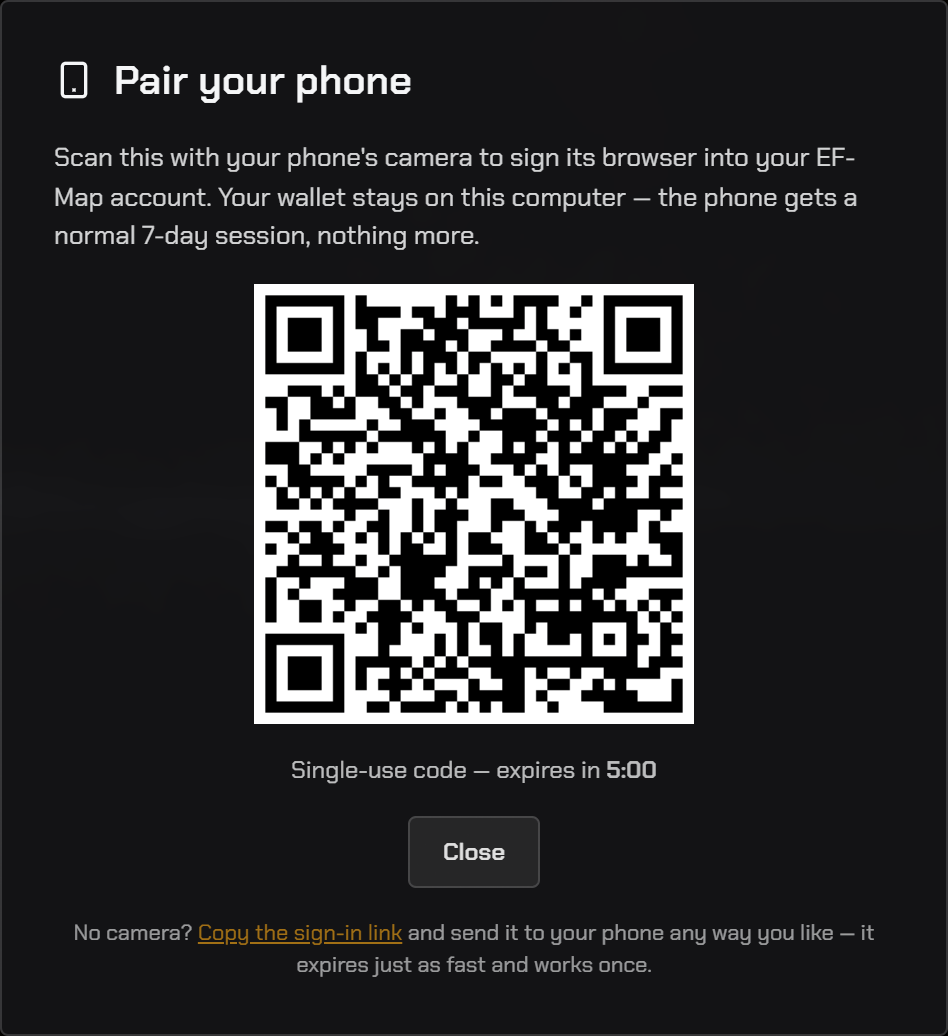
The dialog as it ships.
What actually travels across
I want to be precise here, because "wallet" and "signed in" get blurred together and the difference matters.
The QR carries a single-use code that lives for five minutes and is destroyed the moment it is used. Claiming it signs your phone in as you for seven days, registered as a paired device you can see and revoke. Your wallet, your keys, and the extension never leave the desktop. The phone can be you; it cannot sign for you. If a QR screenshot leaked an hour later it would be worthless.
So on the phone you get your character name, your subscription management, your Discord link, the same signed-in EF-Map you know. What you do not get is the ability to push transactions on-chain from the phone, because there is nothing there to sign with. For a map tool that trade-off is basically free: everything worth doing on the go is reading, planning, and checking.
One thing has changed since this first shipped, and it matters now that a signed-in identity can carry a paid EF-Map Intelligence entitlement. A paired device is not an unlimited copy of you. Your account keeps a short roster of paired devices, capped at a small number, and you can see and revoke them in the Pair dialog on the browser where you signed in with your wallet. Revoke one and that browser is signed out on its next request. Only the wallet-signed browser can pair new devices or manage that roster, so a paired phone cannot quietly pair further browsers of its own. The link is still a key to your account, but it now hands out a bounded, revocable device rather than a permanent clone.
What it unlocks, honestly
Today, modestly: EF-Map already works signed-out on phones, so pairing adds identity rather than access. You will find the new row in the More tab once paired.
The real reason to build it now is what it is the foundation for. Anything personal we ship to phones needs to know whose phone it is: push notifications when your structure comes under attack, tribe alerts, premium features that follow you across devices. All of that starts with pairing, and pairing now exists.
One deliberate scoping note: this is for phone browsers only right now. Our Android app is mid closed test, its Play Store listing is filed as having no sign-in, and we keep those two facts in sync. The app will get this after the test wraps and the paperwork catches up.
The trick we didn't design: any browser, not just phones
Hours after this shipped, Scetrov pointed out something in Builder Chat that I had not clocked: nothing about the pairing link is actually phone-specific. It is a browser-agnostic sign-in key. Instead of scanning the QR, hit "copy the sign-in link" at the bottom of the dialog and open it in Firefox, and Firefox is signed in as you. I tested Edge without the extension and a Chrome incognito window; both just work.
That matters more than it sounds. Until today, signing in to EF-Map required EVE Vault, which only exists as a Chrome-family extension, so Firefox users could never sign in at all. That locked them out of every signed-in-only layer, most notably dormant gate status, the player-reported layer that deliberately requires an identity so no report is anonymous. Firefox users can now sign in once in a browser that runs EVE Vault and carry that identity across.
So the honest name for the feature has been upgraded: Pair Phone is really pair any browser. The same rules apply as the QR: the link is a single-use, five-minute key to your account, so send it to your own devices and browsers, and nowhere else. And if you ever send one to the wrong place, revoke that device from the Pair dialog and it is locked out on its next request.
Can someone fake the QR and sign in as me?
No, and it is worth spelling out why, because "scan this and you are signed in" sounds like it should be forgeable.
The QR contains no identity at all. Not your name, not your wallet address, not anything derived from them. It carries one thing: a random 144-bit code, which is just a ticket number. The actual record saying "this ticket belongs to this account" lives on the EF-Map server and never leaves it. So there is nothing in the QR to reverse-engineer or tamper with; changing the code just gives you a ticket number that does not exist.
Could someone guess a real one? A code is one of 2 to the power 144 possibilities, it lives for five minutes, and it is destroyed on first use. You would need to guess a specific one of two septillion septillion values inside a five-minute window in which one happens to exist. That is not a lockpick, it is a lottery where the universe ends before you win.
And minting a real code requires the one thing an attacker does not have: your existing signed-in session, which was created by your wallet signature on desktop. The server refuses to issue pairing codes to anyone else. That is the whole chain: wallet signature proves who you are, session holds that proof, pairing code extends it, phone receives it. Every link is checked server-side.
The honest caveat runs the other direction: a live pairing QR is a five-minute key to your own account, so treat it like one. Do not screenshot it into a public channel while it is live, and do not scan pairing QRs that strangers post, because a real one would sign you in as them, not steal anything from you. Which, while we are on the subject: the QR in the image above is not a pairing code. Scan it and see.
For the other tool builders
If you run one of the EVE Vault-gated community tools and want mobile access, this pattern is small and copyable: a session-gated endpoint that mints a single-use short-lived code, a QR that encodes a claim link, and a claim route that burns the code and issues your normal session cookie. An afternoon of work if your sessions are already cookie-based.
The one thing pairing cannot give you is on-chain actions from the phone, so if your tool needs signatures at the moment of use, you still need the desktop. But identity-gated reads cover a lot, and anything a user can pre-fund from their desktop works fine from the couch afterwards.
Try it
Live now on ef-map.com.
- On desktop: sign in, click your name, choose Pair Phone
- On your phone: point the camera at the QR and tap the link
- The phone lands on the More tab, signed in as you, for seven days
If it confuses you anywhere, that is a bug in my book. Tell me in the EF-Map Discord.