If this blog has looked quiet since the end of August, that is because I have been building on the other map. EF-Map itself was not stuck. The work just was not happening here.
A few weeks ago I cloned this repository, took the EVE Frontier universe out of it, and dropped EVE Online's cluster in instead. That became EO-Map, which has been live at eo-map.com since the 18th of August. I wrote about that clone at the time. The short version, if you did not read it, is that I thought swapping the universe would be the easy part, and it was not. The two games do not share a scale, a data surface, or even a clear idea of what a map is for.
Underneath that clone was a hope I was already saying out loud. If you develop two maps against two very different universes, some of the solutions should eventually flow back. I did not know when. I did not know what they would be. As of this week I do, and they are on EF-Map now.
A creator using EO-Map asked whether the map could be driven with a 3Dconnexion SpaceMouse. Fair question. I did not own one, so it sat in the pile of things that only become real once somebody can actually rest a hand on the hardware. Then I bought one. Then it stopped being a small request.
What came out of it, on EO-Map first, was proper map-wide SpaceMouse support and a much larger filmmaking toolset I am calling Creator Mode. Both were developed and physically tested on the EVE Online map. Then I adapted them back into this one. That is the payback the clone was supposed to produce. It just arrived faster than I expected.
It started as a 3D mouse
SpaceMouse is not a Creator Mode feature, which is worth saying before the pictures start. It lives under Display Settings, Interface, 3D mouse, and it drives the ordinary universe view. Free Flight, Orbit, movement presets, per-axis locks, inversions, scene speed. You click Connect yourself. I am not going to auto-connect it on page load, because Chrome will then ask every visitor whether ef-map.com can look for devices on their local network, and most people opening a star map are not holding a SpaceMouse.
The hardware testing was the useful part. After I had shipped it, I rolled the camera, took my hand off the puck, and waited. About eight seconds later the map quietly levelled itself. The camera stayed where I left it. The look stayed where I left it. Only the roll decided it knew better. Same bug on EO-Map and EF-Map, because they still share that camera handoff. The map was releasing ownership of the camera after a pause, which is correct, and as it did so it reset the camera's up vector to straight up, which is not. If you had composed a banked shot and then reached for a drink, the composition changed itself.
That is now fixed on both maps. Ownership can let go without rewriting the picture.
Creator Mode is about the picture
Dedicated Cinematic Mode still exists. It is a presentation mode. Auto camera, hidden chrome, the map performing itself. I rebuilt that earlier this year and I am not replacing it.
Creator Mode is the other job. You author the picture. Standard and Cinematic are starter looks, one-time loaders. Once they have dumped their values into the scene they stop mattering. From there you decide whether the scene should look like the ordinary map or like film, tint the stars, pick a background, push atmosphere layers around, grade the frame, pick regions and emphasise them, put labels on those regions, drop a title on the glass, freeze the ambient motion, hide the live kill flashes without touching the actual data, and fire a pulse or a supernova by hand when you want one in the shot.
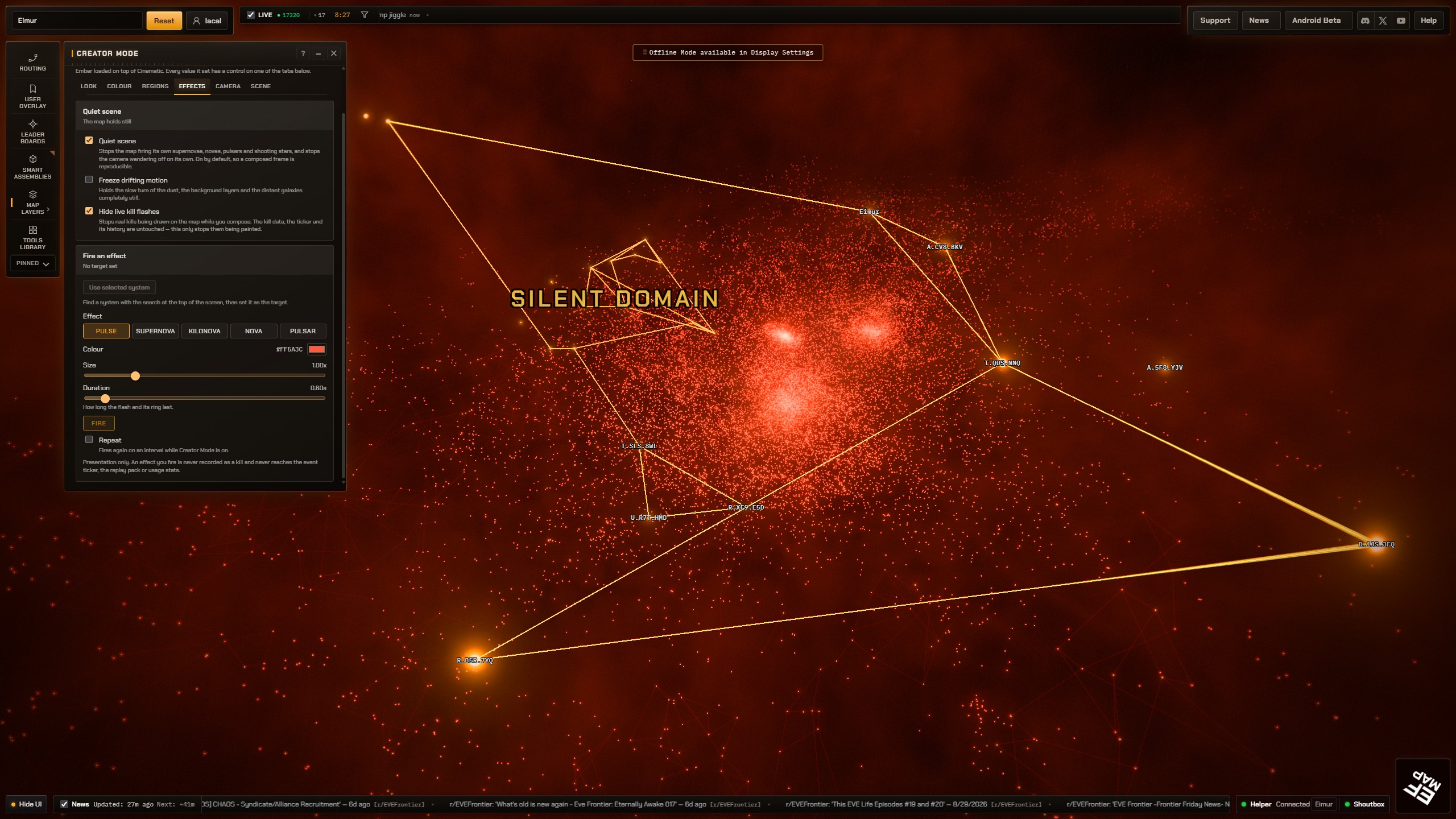
That screenshot is a real composed scene, not a preset. Ember loaded on top of Cinematic, the stars went red, Silent Domain got picked out of EVE Frontier's 274 regions, compact system names are on, and I am sitting on the Effects tab with a Pulse ready to fire. That is the point of the tool. You are not toggling a cinematic look. You are deciding what the frame is.
The panel is organised around the decisions a creator actually makes. Look covers the grade and the post. Colour covers star treatment, tints, gate colour, the backdrop. Regions is selection, emphasis, what happens to everything outside the selection, and the region labels. Effects is quiet scene, freeze the drifting motion, hide live kill flashes, and the manual triggers: pulse, supernova, kilonova, nova, pulsar. Camera only points at the 3D mouse settings, it does not own them. Scene is save, load, import and export.
A couple of those are worth being precise about, because they are easy to misread. Quiet scene stops the map doing its own supernovae and shooting stars so a composed frame stays still. Freeze drifting motion holds the dust and the background. Hide live kill flashes stops those flashes being drawn. The kill data and the ticker are untouched. I did not want a recording tool that quietly dropped history on the floor.
Star colour is a choice between the map's natural star-type colours, a film palette (realistic, red, blue, and the rest of the existing set), or leaving the app's own Star Colouring showing, planet count, star type, temperature, territory. Background is black, the layered nebula, or deep space. Deep space and the volumetric atmosphere both need the film path, so the tool forces that rather than letting you tick a box that does nothing. There is a title overlay if you want a caption on the glass, which is a different thing from the region labels. Region labels sit in the world on the region. The title sits on the screen.
You can save that scene, load it later, export it, import it. The file is JSON with the kind ef-map.creator-scene, so a New Eden scene cannot quietly hydrate onto Frontier region ids. I have had that class of bug, and I would like not to have it again.
There is a clean plate for recording, which hides the interface without using the global Hide UI path, because that path unmounts things I do not want a recording session to break. Work Safe Mode still wins over everything, Creator included, so a violent red scene does not punch through if you have Work Safe on.
You will find it under Tools Library, Map Visuals, Creator Mode. It is desktop only. It does not run in the phone layout, in Solar System View, or while Compare Universe Scale is up. Ordinary visitors who never open it do not download it. The boot budget on this app is 753,000 gzipped bytes and I did not raise it. Creator and the SpaceMouse driver both lazy-load.
What else came back with it
Creator Mode is the headline because it is the thing you can see. The week around it was not a single feature. I am not going to paste the ledger. A few of the visible ones are worth naming because they change how the map feels even if you never open Creator.
Compact System Names came from EO-Map, where the cluster is small enough that you can get away with a modest label budget. EVE Frontier has 24,026 systems. The same idea with New Eden's numbers would have been either empty or a wall of text. EF-Map's layer is under Map Layers, System Names, and the simultaneous budget is 450 rather than EO's 180. Region labels in Creator are a separate layer, a pool of 72 over those 274 real Frontier regions, so Silent Domain in that screenshot is a real region name sitting on real member stars, not a title overlay pretending to be geography.
Invert Scroll Zoom is a preference under Display Settings, because some people have their wheel backwards and I am one of them on certain days. It reverses universe zoom and the wheel gesture that enters Solar System View. Off by default.
The themed Cinematic palettes actually bloom now, which they were supposed to. The glow and flare sliders work on both render paths instead of freezing the moment you turned Cinematic Effects on. Toggling dedicated Cinematic Mode no longer teleports the camera home in the middle of a shot. Galactic north stays galactic north across that rebuild. The outer edge of the interstellar gas feathers out instead of clipping like a lid. Hover and selected labels stack above the dense name layers without a CSS hammer.
None of that was invented from scratch on the 6th of September. Most of it was found, fixed, or built on EO-Map, then adapted. The adaptation is the work. Camera distances, label budgets, region ids, live-kill paths, even the name of the JSON document, all of those had Frontier-shaped answers that were wrong if you copied New Eden's.
What could not copy straight across
| EO-Map | EF-Map | |
|---|---|---|
| Compact name budget | 180 labels at once | 450 labels at once |
| Regions | 103 | 274 |
| Default camera distance | 165 LY | 5,000 LY |
Those are not the interesting numbers because they are large. They are interesting because copying the left-hand column onto this map would have been a different kind of bug. EO's zoom max is 300. Import that onto a map whose default framing is 5,000 light years and the camera just clamps.
You cannot just merge them
I think that is the actual lesson, and it is the opposite of what a tidy engineering story wants. Shared ideas can move. Shared branches cannot. EO-Map has spent weeks growing EVE Online assumptions: ESI, sovereignty, a 2D schematic layout, a cluster about 143 times smaller along its longest axis. EF-Map has spent a year growing EVE Frontier assumptions: a client-extracted universe, Smart Gates, 14,480 light years of cluster. Periodically merging one into the other would spend its time deleting the other game.
The original idea was not a shared codebase forever. It was that a hard problem in one universe would force a better answer, and that answer could be rewritten for the other. This week was the first time that felt tangible rather than like a thing I was telling myself so the detour sounded responsible.
Now, I am still a vibe coder pointing language models at a repository. The SpaceMouse idle-roll bug was not caught by a test. It was caught by sitting there with a real puck in my hand for eight seconds. That is going to keep being true for anything that involves a device, a look, or a composition. The fork is useful because it keeps putting me in front of problems this map has not had yet. It is not useful as a branch I can merge.
So yeah. If you want to poke at Creator Mode, open EF-Map, then Tools Library, Map Visuals. If you have a SpaceMouse, Display Settings, Interface, 3D mouse, and click Connect. Any issues with either map, let me know and I will get them sorted.
Related Posts
I Cloned EF-Map to Make an EVE Online Map, and It Mostly Worked is the previous chapter: why the clone happened, why the universe swap was not the easy part, and the hope this post is cashing.
Refreshing Cinematic Mode: Our Oldest EVE Frontier Feature, Rebuilt is the presentation mode Creator Mode is not replacing.
Controller Support for EF-Map: Flight Mode and Recorded Camera Flights is the other way of driving the camera by hand, which is how SpaceMouse had to coexist with a pad.
Three.js Starfield: 24,026 Stars With THREE.Points, Not InstancedMesh is the renderer these looks are still sitting on.