Pop Out: EF-Map Panels in an Always-on-Top Window Above EVE Frontier
Pop out is the no-install way to keep an EF-Map panel in view while you play EVE Frontier. The ⧉ Pop out button in a floating panel's title bar moves that panel into a separate always-on-top browser window, so the Killboard, a route list or a checklist can stay above the game in borderless windowed mode, or sit on a second monitor. It is an ordinary browser window rather than an overlay drawn inside the game client, so there is nothing to install.
The second button opens the Killboard, where Pop out sits in the title bar just before Minimise. Pop out is part of the desktop map. In Chrome, Edge, Opera and Firefox 151 or later the window stays on top of other windows; other desktop browsers open an ordinary popup window instead, and phones and embedded maps have no button.
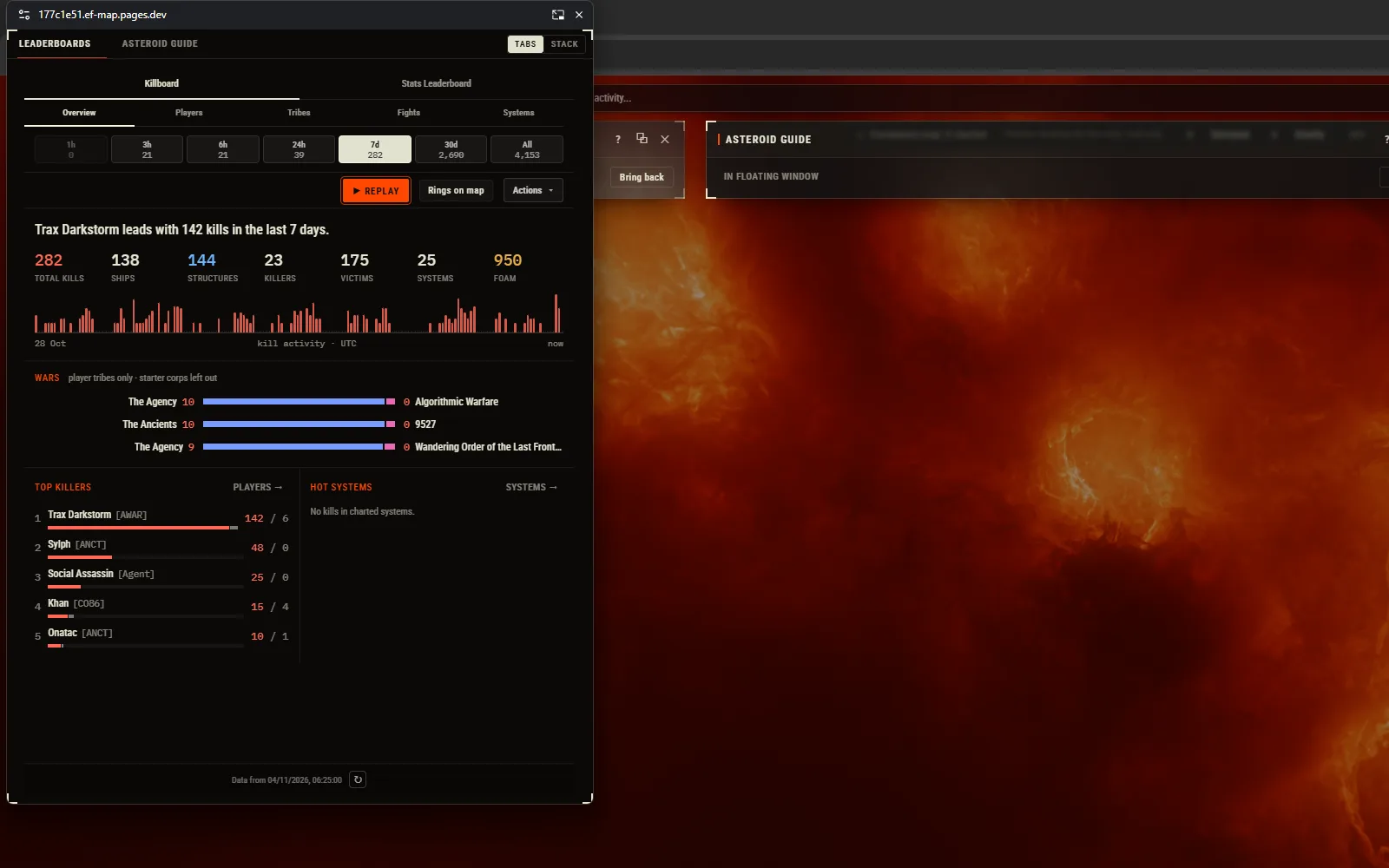
How to Pop Out a Panel
- Open a panel on the desktop map: the Killboard, Route Systems, the EF Helper window or any of the other panels listed below.
- Press Pop out (⧉) in the panel's title bar, just before Minimise. The panel moves into a separate window of roughly its own size, and its place on the map shows a slim stub reading In floating window, with a Bring back button.
- Add more panels. On a second panel the button reads Add to floating window, and that panel joins the same window as a tab. A Tabs / Stack switch in the window's strip shows one panel at a time or all of them together, and the choice is remembered.
- Send it back. Return to map on a panel, or Bring back on its stub, docks it again. Closing the floating window returns every panel to its place on the map with its state intact.
What Stays the Same in the Floating Window
Pop out changes where a tool is displayed, not what it does:
Look and State
The panel keeps its look and everything in it: typed text, selections, filters and scroll position.
Still Wired to the Map
Selecting a system in the floating window selects it on the map, a new route on the map updates a popped Route Systems list, and the EF Helper window keeps showing its telemetry.
One Window, Tabs or Stack
There is only ever one floating window per EF-Map tab. Extra panels join it as tabs, or as a stack with a collapsible header for each panel.
The Same Tools
No panel gains features, polling or automatic refreshes. The Killboard in a floating window is the same snapshot, with the same timestamp and Refresh button, as the docked one.
Keep a Killboard, Route or Checklist on Top of the Game
A popped-out panel works as a lightweight EVE Frontier overlay for whatever you need between jumps. Route Systems can stay beside the game while you fly a route, a simple EVE Frontier route overlay. The Killboard can sit in a corner for a look at recent fights, with Refresh when you want a newer snapshot. The EF Helper window keeps its mining and combat telemetry in view, and a System Checklist, Item Codex or Blueprint Calculator lookup stays one glance away. The window can also be dragged onto a second monitor, so it sits next to the game instead of over it.
In Watch view, the big-screen layout, the Frontier feed and the Live Events card have their own Pop out buttons. Popping the feed moves the whole feed into the floating window and switches the tab to Map view for the session; returning it, or closing the window, puts Watch view back. The Live Events card pops out on its own at its expanded size while Watch view stays, and live rows keep arriving in both cases.
Borderless Windowed, Not Exclusive Fullscreen
The floating window stays above EVE Frontier when the game runs in borderless windowed mode. That was checked over the real game, including with the window moved to a second monitor. Exclusive fullscreen hides every normal window, this one included, so if the window disappears behind the game, switch the game to borderless windowed mode.
How It Compares to EF Helper's In-Game Overlay
EF-Map has two ways to keep information in front of you while you play. EF Helper is a free Windows desktop companion from the Microsoft Store that draws an overlay inside the EVE Frontier client, styled like the game. Pop out is a plain browser window that holds the EF-Map panels themselves.
| EF Helper in-game overlay | Pop out | |
|---|---|---|
| What it is | A desktop app that draws an overlay inside the game client | A browser window that stays on top of other windows |
| Install | Free from the Microsoft Store | Nothing to install |
| Runs on | Windows | Any desktop operating system with a supported browser |
| What it shows | Mining, Combat, Today, From here, Notes and Settings windows, damage alerts and a Bookmark button | 35 EF-Map panels, plus the Frontier feed and the Live Events card |
The two work together: the EF Helper window in EF-Map can itself be popped out, and keeps showing the helper's telemetry.
Which Panels Have Pop Out
35 panels have the button, including the Killboard, Events, EF Helper, Route Systems, Routing, User Overlay, Shared Storage, Intelligence and custom intelligence panels, Query Console, Panel Creator, Gate Activity, Economy, Activity Tracker, Battle Replay, Log Parser, Display Settings, Session Stats, Scout Reports, Public Structures, Smart Assemblies, System Finder, Keeper Search, System Checklist, Region Stats, Item Codex, Blueprint Calculator, Asteroid Guide, Mullet Check and Discord Presence.
Tools bound to the 3D map do not have it: Cinematic Mode, Creator Mode, Director, Flythrough, Controller Flight, Explorer Cards, Universalizer and the Solar System controls. Nor do the games, the Tools Library launcher, or Awakened Cinema, whose video would reload when moved.
Browsers
| Browser | What Pop out opens |
|---|---|
| Chrome and Edge 116 or later, and Opera, on the desktop | An always-on-top Document Picture-in-Picture window |
| Firefox 151 or later | An always-on-top Document Picture-in-Picture window |
| Safari and other desktop browsers | An ordinary popup window with the same tabs and stack, which is not always on top |
| Phones, the mobile layout and embedded maps | No Pop out button |
Document Picture-in-Picture is the browser feature that keeps the window above other windows. On Windows, the ordinary popup can be pinned on top with PowerToys Always On Top (Win+Ctrl+T).
Limits
- Not over exclusive fullscreen. The window shows over borderless windowed mode only.
- Not click-through. The window is opaque, clicks land on it rather than on the game, and clicking it takes keyboard focus from the game until you click back into the game.
- The browser places the window. Chrome decides where it opens (bottom right by default), remembers its last size and position, and draws its own title bar. EF-Map cannot move or restyle that bar; drag the window where you want it.
- One window per tab. More panels join the same window as tabs. Refreshing or closing the EF-Map tab closes the floating window (a browser rule), and the panels reopen docked.
- The Killboard stays a snapshot. It shows the same indexed snapshot, timestamp and Refresh button as the docked Killboard; popping it out does not make it refresh more often.
- Some actions stay in the main tab. The Log Parser's folder picker, the EF Helper's local-network permission prompt and the wallet connect for Shared Storage open in the main EF-Map tab.
Related Resources
- EF Helper: the installed Windows companion with an in-game overlay
- Killboard: indexed combat snapshots, which pop out unchanged
- Watch view: the big-screen layout whose Frontier feed and Live Events card pop out too
- Route Planner: plan the route that Route Systems then lists beside the game
- EF-Map FAQ
- All EF-Map Features
Frequently Asked Questions
Is there an EVE Frontier overlay that needs no install?
Yes. EF-Map's Pop out moves a panel into an always-on-top browser window that stays above EVE Frontier in borderless windowed mode, or sits on a second monitor. Nothing is installed, and the panel keeps its state and its link to the map. For an overlay drawn inside the game client, EF-Map also has EF Helper, a free Windows desktop companion.
Can I keep the EVE Frontier killboard on top of the game?
Yes. Open the Killboard on the desktop map and press Pop out in its title bar. The floating window shows the same snapshot, with the same timestamp and Refresh button, as the docked Killboard.
Does Pop out work over a fullscreen game?
Not over exclusive fullscreen, which hides every normal window. It stays above EVE Frontier in borderless windowed mode, and it can also be moved to a second monitor.
Which browsers keep the window on top?
Chrome and Edge 116 or later, Opera and Firefox 151 or later, on the desktop, open an always-on-top Document Picture-in-Picture window. Other desktop browsers open an ordinary popup window that is not always on top, and phones and embedded maps have no Pop out button.