I posted a music video to the screenshots and video channel in the official EVE Frontier Discord this week. It's the Cycle 7 map's stars dancing to Maré Noir's dark techno cover of Sweet Dreams, four and a half minutes of it. Someone replied "Dancing stars are back", which made me laugh, because the last time I posted dancing stars it was me hitting Windows Shift R and screen recording the Universalizer while a song played. This was my reply.
Indeed, and it probably seems a bit frivolous making videos of dancing stars, but there's a point to it. Every video I make improves the agent driven video pipeline, things like camera control, scene changes and effects
This is the long version of that reply. Between 6 and 14 October I put out seven videos on the EF Apps YouTube channel, and an AI agent filmed every one of them by driving the map in a browser. I didn't screen record any of it. They've also got noticeably better from one to the next, and I don't think that's because the model got any smarter in a week. I'll come back to that, because someone later in the same thread used the word training, and I think it's the wrong word.
How it used to work
Up until fairly recently, making a video for me meant Windows Shift R, the Snipping Tool's screen recorder, and posting the clip straight to Discord. For one older video a couple of months ago I set up OBS. Either way I was the camera. I'd fly the map around with the mouse, and how smooth it came out depended on how steady my hand was and what else the PC was doing at the time.
The first video an agent made was in July. It's the 86 second EF-Map clip on the channel, filmed in headless Chrome at 1440p and 60 frames a second with nobody touching the mouse. It worked. Then the whole setup got lost, because it lived in a scratch folder that gets cleaned out, and the next time I asked for a video the agent had to work everything out again from nothing. In August it was rebuilt properly as a tool in the repo, and that tool, or a copy of it in the EO-Map repo, has made everything since.
What came out in August was okay. There was a Panel Creator demo built unattended by a team of agents, a YouTube Short, a What is EO-Map? video for the EVE Online map, and three 15 second adverts for EVE Online's Alliance Tournament that I submitted on 29 August. I'm actually a bit regretful about those adverts now. I got them in early, and the pipeline has come a long way since.
What the pipeline actually is
In plain terms, a video is a shot list. It's a JSON file in the repo that describes each scene: where the camera starts, where it moves to and how long it takes, which panels to open and what to click, which title cards to show and for how long. A script launches Chrome without a window on my own graphics card, an RTX 4070 Super, usually opens the real ef-map.com, plays each scene in a fresh browser session and records it at 2560 by 1440. The end card is filmed in the browser like any other scene, then ffmpeg cuts the scenes together and lays the music underneath.
This is a real scene from the starter system guide, trimmed down a bit. It flies to T.22G.4D1, frames the camera, then glides it for twelve and a half seconds while a card explains gate status.
{
  "id": "04-gates",
  "setup": [
    { "do": "flyTo", "system": "T.22G.4D1", "settleMs": 2500 },
    { "do": "cameraPose", "target": { "x": -2733.6, "y": 144.5, "z": 884.3 },
      "radius": 190, "azimuthDeg": 20, "elevationDeg": 22 }
  ],
  "actions": [
    { "do": "parallel", "actions": [
      { "do": "cameraPose", "target": { "x": -2810.8, "y": 179.5, "z": 921.6 },
        "radius": 150, "azimuthDeg": -15, "elevationDeg": 28,
        "durationMs": 12500, "ease": "easeInOut" },
      { "do": "card", "position": "lower-left",
        "kicker": "03 · Is the gate open?",
        "title": "Riders report every stargate as active or dormant",
        "durationMs": 9500 }
    ]}
  ]
}
The reason it's a file and not just a chat with the agent is that deciding what to show is the expensive part of any video. Written down, that decision can be looked over, changed and re-rendered without starting again. A lot of the moving around uses the same commands as EF-Map's Ctrl+K palette, which I opened up to AI agents through WebMCP back in July. When the agent selects a system or plots a route, it's asking the map the same way you would if you typed it into the palette.
Numbers on the cards are read from the live map on the day it renders, and gate status comes from a real export of my own signed-in session. That wasn't always the case for everything. The trailer used made-up data for its tribe network, fuel and Intel scenes so nobody's real setup was on show, and the Panel Creator demo in August ran on test data too. By the Intel video I'd decided that wasn't good enough, so these days a promo shows real data. If a video says something about the map, the map should actually say it.
Seven videos in nine days
Each of these was made to show something, but each one also left something behind in the pipeline. That's the bit I find interesting, so that's what I'll go through.
The first, on 6 October, was how to get out of your starter system, made for the "What I Wish I Knew" community challenge. One problem, answered step by step on the live Cycle 7 map, with no voice and the cards doing the explaining. While the first version rendered I had a Discord stream playing, and the Cinematic scenes held between 20 and 35 percent of their frames. I saw it as hitching. That was the first real lesson. The recorder can only capture what the browser manages to draw in real time, so anything else using the GPU ends up in the video. The agent also worked out how to switch Cinematic Mode on without its auto tour dragging a scripted camera back out, and found that a supernova sized for the old 24,000 system map turns the much smaller Cycle 7 map completely white.
On 11 October came why your Rider takes strain, my second challenge entry, showing off Gravity. The gravity field is drawn by raymarching every pixel on screen, which is heavy. At 1440p with the game running, 20 percent of frames were held. At 1080p it was about 2 percent, so that one went out at 1080p. Headless Chrome also has no mouse cursor, which matters when you're trying to show someone what to click, so the agent built a capture kit that draws one. And the map's looping effects stop about 20 seconds after the last bit of input, so the kit nudges the map every couple of seconds to keep them going.
Then the EF-Map trailer, Map your way. Panels filmed at 1440p looked tiny, so the agent worked out how to film the interface at a bigger scale without dropping the resolution. The edit got cut to the music properly, with the drop of Scott Buckley's Discovery landing on a hard change of shot and the logo starting on its peak, and it was the first one with a proper YouTube thumbnail. Watching it back is also what made me notice how dated the hover card looked, which turned into a whole redo.
The EO-Map trailer was a do-over. The first attempt used EO-Map's own copy of the pipeline, which had drifted apart from this one, and it was a total bust. I deleted it. The second was made overnight with EF-Map's pipeline pointed at eo-map.com and came out at 2 minutes 49. Two days later I had the two copies merged, so there's one pipeline for both maps now, and nothing learned on one side gets lost to the other.
On 13 October it was the Log Parser, using my own Cycle 7 game logs. Headless Chrome can't film the folder picker, so the pointer glides to the button and the log folder is handed straight to the page. Filming it turned up a bug as well. Kill and death pins on the map were drawing small and white unless you had a bookmark tint setting switched on. That got fixed and shipped. The same day I made a short Discord-only clip of the markets in Public Structures, which added a kit for filming pages that aren't the map, like the Open Market.
Then Sweet Dreams, which gets its own section below. And on 14 October, six Intel tools live from the chain. That's the one where I'd had enough of test data, so the agent opened a browser window, I pasted a pairing link from my profile into it, and the capture ran signed in as me with saving blocked, so it couldn't create panels on my account. The AI answers in the Query Console were recorded once and replayed, so every take shows the same answer, and the session was logged out afterwards. That one still used the real-time recorder, because clicks and typing need real time, and I closed the game when the agent asked, because the game client on its own was causing about 20 percent held frames.
Sweet Dreams, the frivolous one
Sweet Dreams started as half productive, half fun. The productive half of the brief was to make the pipeline better for agents, however crazy the request. The fun half was a full-length music video with every cut and flash on the beat. Three things came out of it that I think will matter a lot more than the video itself.
The first is frame stepping. Every video before this was recorded in real time, so the GPU had to keep up or frames got duplicated. Now the page runs on a fake clock. The agent freezes time, moves it forward exactly one sixtieth of a second, lets the map draw, takes a screenshot, and repeats. Sweet Dreams is 16,626 frames and not one of them is held. Filming its 4 minutes 37 seconds took 23 minutes, about 12 frames a second, and because nothing runs in real time it doesn't matter what else is using the GPU. I was playing the game while it rendered. Compared with the earlier videos, where I was closing things down and watching the GPU load while the agent drove the map, that was quite novel to me.
The second is music analysis. A script listens to the track and writes a cue sheet with every beat and bar, the sections labelled intro, build, drop and so on, where the kicks and claps land, and how loud each frequency band is on every frame. Not every track holds a perfect tempo, so it follows the kick drum rather than assuming a fixed grid. Get that wrong and the effects can drift a few frames off the beat by the last minute, which you can see.
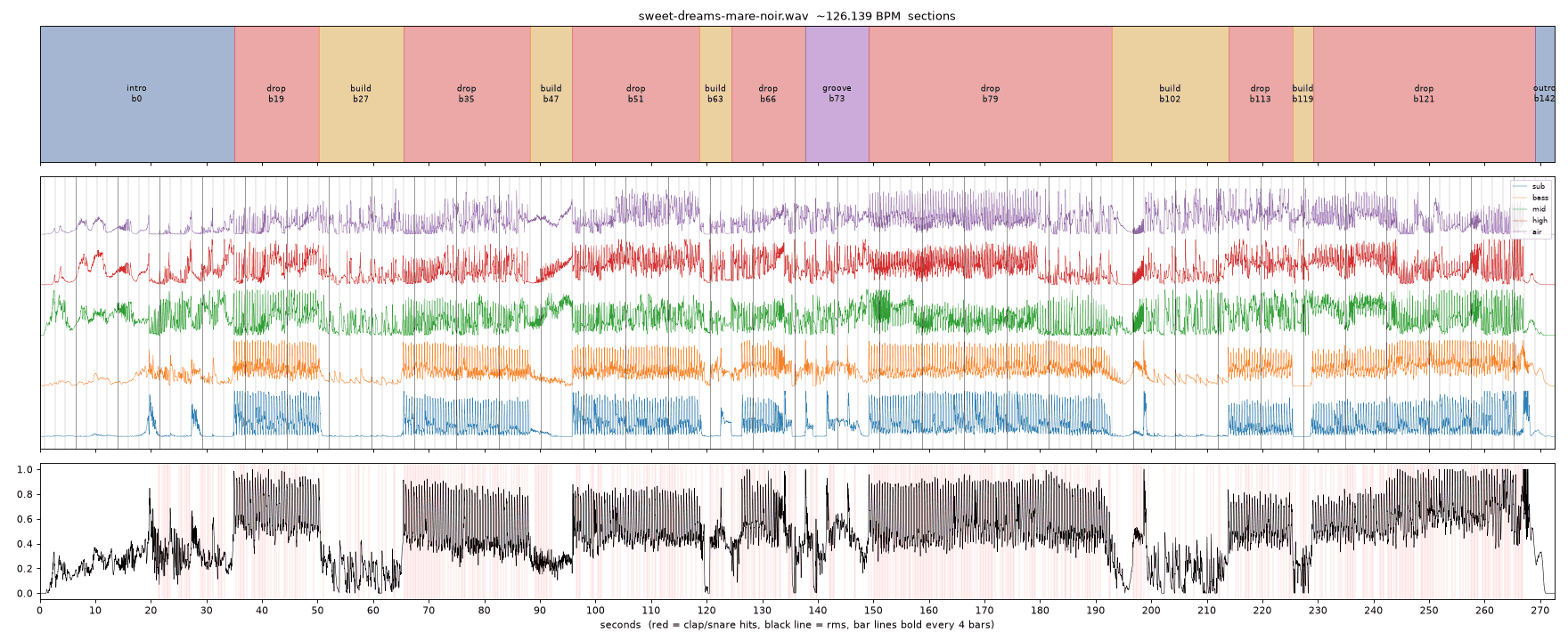
The third is the music kit. The whole video is a score written as data. Camera positions on a timeline, small camera punches on the kick, bloom pulses, novas fired at specific star systems, and the title and end cards. The dancing itself is the Universalizer's star wave, the same one that reacts to whatever music you share with it in the app, just fed from the cue sheet instead. Because every frame is worked out purely from the time, the agent can storyboard the whole video as contact sheets in about a minute, and render a 720p preview with the music in about 13 minutes, before committing to a 23 minute master.
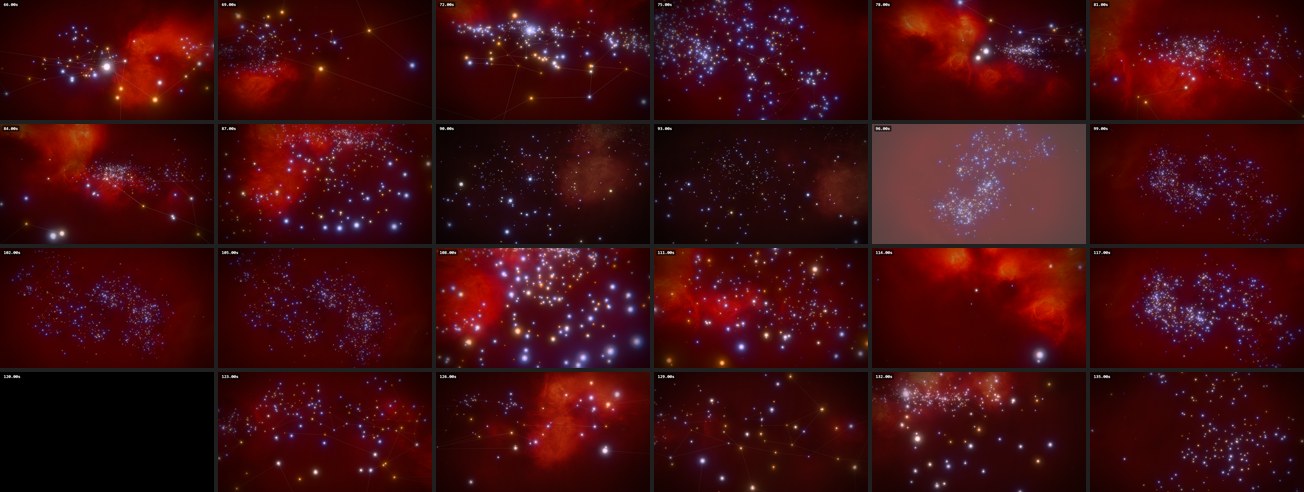
It still took four review passes. My note on pass two was that the camera had "jitter and wander", and it turned out the agent had put a small random shake on every clap, roughly 500 of them. The agent wrote a check that counts how often the camera changes direction, and that pass had 81 left-right and 107 up-down reversals a minute. The next pass had 0.4 and 2. I also noticed the effects landing about 0.7 seconds after the big sub hits, because they'd been placed on the loudest moment nearby rather than the actual downbeat. None of that was obvious to the agent until I watched it. But all of it is written down now as rules for the next music video. Deliberate camera moves, no snap zooms, stars still under the title until the first big hit, and effects on the real hit, not near it.
Then there's the bit after the render. Every video now comes with a YouTube thumbnail, a still from the map with the title laid over it, usually with an A and B version to test. The agent writes the YouTube title and description with the music credit and the game link, plus the X post and the Discord copy, and gives them to me ready to paste. One 1440p master goes to both YouTube and X. So once a feature is worth showing, highlighting it is mostly a case of deciding what the video should say.
The one that didn't work
To be fair to the other side of this, not everything has landed. Straight after Sweet Dreams I had the agent do the same song on EO-Map overnight, and three passes later I rejected it. Pass two was flat. Every time a shot was too bright the fix had been to turn an effect down, and nobody went back and checked the energy against the EF-Map cut. Pass three was out of step with the beat. My note at the time was that it was like watching someone's dad try to dance to an upbeat song. The renders are gone. What I took from it went into the pipeline's notes, including measuring the beat sync as a number before I watch anything, and they'll be read first when it gets another go.
That's also why I don't think the human is going anywhere in this. Taste is still my job. What the pipeline has done is move my job from spotting juddering frames to deciding whether a camera move feels right, which I wrote about from a different angle in the link styles post.
It isn't training
Later in the same Discord thread, someone said they'd noticed they were training the AI, that it figures out how to do things quickly once they've shown it, and that the labs must be watching how people use them and adapting. I know what they mean. This was my reply.
Yeah I know what you mean, although I'd be careful with the word training, especially if you're using AI for work. The model itself isn't actually learning from each session, it's the context, instructions and tools we're building around it that improve, so the next agent can pick up all that knowledge without having to figure everything out again
Actual model training is a different thing, that's what settings like Claude's "Help improve our AI models" relate to, which I've got switched off. It's an important distinction I think, particularly when you're working with anything confidential
The video pipeline is a good example of what I mean. As far as I know every one of those seven videos was made by the same model, Opus 5.5, and it learned nothing between the first and the seventh. The notes and tools around it are what changed. There's a notes file in the pipeline that's now 768 lines long, in 16 sections, and most of the later sections are named after the video that taught them. Its opening paragraph is about that July setup that got lost, and it ends with "Add to this file rather than to a chat log." There's a music catalogue with each track's licence, its exact credit and a measured loudness profile, because composed tracks often open on near silence and that had already shipped in a published video once. There's a ranked list of what would make agent videos better next, a validator that checks all 46 shot lists, and a set of rules for how I like music videos to look, partly in those notes and partly in the agent's memory files on my machine.
A new session gets pointed at those before it starts. That's the "context, instructions and tools" from my reply, and I think it's why the seventh video was better than the first. It's also something I own. All of it is in the repo or on my machine, and none of it lives inside a model. That setting I mentioned is the one that covers actual training, and if you're using AI for work, with anything confidential, it's worth knowing which of the two you're doing.
Why I'll keep making the frivolous ones
So far the fun videos have paid for the serious bits. Sweet Dreams gave the pipeline exact frames at any GPU load, which any video that doesn't need real-time clicking can use, a cinematic guide or a trailer as much as a music video. The EO-Map one, rejected or not, worked out how to share one score across several scenes. The trailer's music sync and the strain video's cursor are just part of the toolkit now. So when I next need a serious video, say for a big feature or the changes in the next cycle, the camera control, scene changes and effects are already proven, and I'll be thinking about what to say rather than about frame rates.
There's a longer-term angle to this as well. EF-Map's Director already lets you ask your own LLM for a camera sequence, using its published spec, and paste it into the map. In browsers that support WebMCP, which is still an early preview in Chrome, an AI agent can already search systems, select them and plot routes using the same commands as the Ctrl+K palette. I think in a year or two you'll just ask your own assistant to explore a region or plot a route for you, rather than doing it all by hand. The video pipeline is a version of that I've been running most days lately, so I'm finding the rough edges first.
So yeah, I'll keep making them. I enjoy watching them back, and I think for a lot of people they're informative, or can be. Every one I make leaves the pipeline a bit better for the next. Or I just make the stars dance, I guess. If there's something on EF-Map you'd like to see a video of, let me know.
Related Posts
Making a Trailer Showed Me What I'd Left Behind on EF-Map is what happened after I watched the trailer back.
EF-Map's New Link Styles, and Why the Human Still Has to Be in the Loop is the same point about taste, made with a map feature instead of a video.
From SEO Sweep to WebMCP: EF-Map Now Speaks to Browser AI Agents covers the agent commands the pipeline drives the map with.
Opus 5.5 Changed How I Use AI Agents, and My Logs Back It Up is how I work with the agent that made these videos.