The Watch view article went up on the Tuesday. That evening I did something lazy that turned out to be the best question I asked all month. I opened ChatGPT, pointed it at my repos, and asked whether there was any browser technology I wasn't using that would benefit a tool like EF-Map. It came straight back with something called the Document Picture-in-Picture API, and I'll be honest, the name did nothing for me. Picture in picture is the thing YouTube does when you click away and the video carries on in a little box in the corner. I didn't see what that had to do with a map.
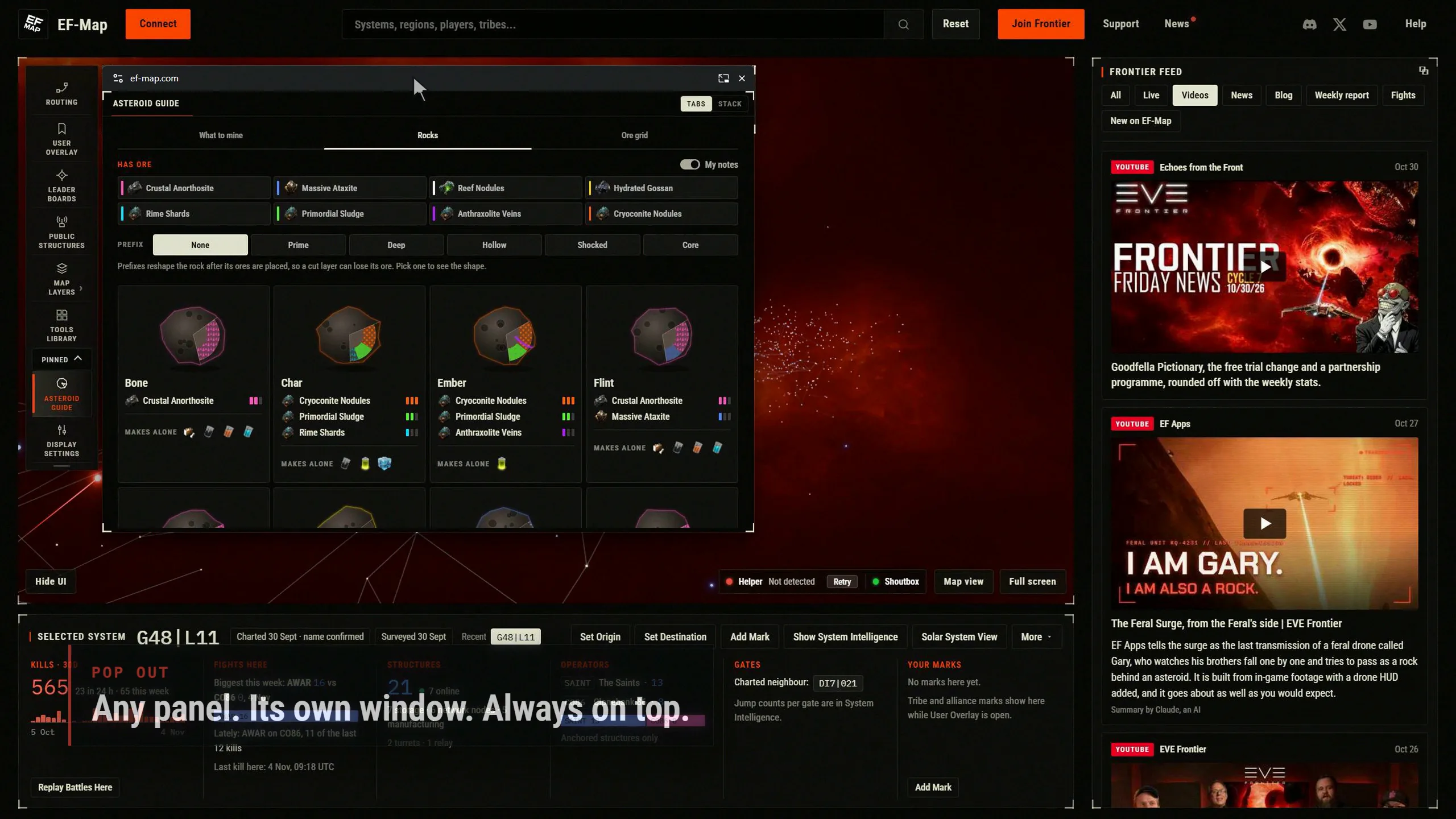
Then it explained. The video version has been around for years. The document version is newer, and it lets a web page open a small window that stays on top of everything else on your desktop, and put any HTML it likes in there. Not a video, a piece of the page. ChatGPT gave me a playground page with ten demos on it, floating colour pickers, a chat bubble, a debug console, a game minimap, and I clicked through them with the slightly stupid feeling you get when a thing you'd have called impossible a minute ago is just sitting there in your browser working. The minimap one did it for me. EF-Map is a map people run next to a game. If a panel could leave the browser and sit over the game, always on top, with nothing to install, that would suit everything.
So that is where Pop out came from, and this article is the story of the night between that question and the feature being live, plus what it cost, because I keep the logs and I think the numbers are the useful part.
What the API actually is
I'll keep this short because I am not the person to explain browser internals, but the shape of it matters for what follows. A page calls one function, in response to a click, and the browser gives it a second window. The window is always on top, it has the browser's own title bar with the site name and a close button, and the page can move its own elements into it. Chrome and Edge have had it since version 116 in 2023, Opera too, and Firefox added it in version 151 in May of this year. Safari does not have it, and as far as I can tell has not said when it will. The browser allows one such window per tab, and it decides where the window opens and remembers where you last put it for that site.
The reason that last paragraph matters is that most of the build was about those constraints rather than the API itself. One window per tab means the moment two panels can pop out you need somewhere for the second one to go. The window being a separate document means anything in the app that assumes there is only one window, menus, tooltips, the clipboard, dialogs, draws in the wrong place until it is told otherwise. And the browser owning the window's position means I can't put it where I'd like; it opens bottom right the first time and where you left it after that.
The feasibility evening
Tuesday the 3rd, in the evening, was research. I started a Claude Code session on an isolated branch and asked for a feasibility report, a prototype and a set of mock-ups, nothing in production. The prototype popped the Asteroid Guide and the Killboard into a floating window inside the hour, styles identical, state kept. The thing I most wanted to know, whether the window stays above EVE Frontier in borderless windowed mode and follows you onto a second monitor, I checked myself with the game running and the playground's demo, because no document was going to convince me. It does.
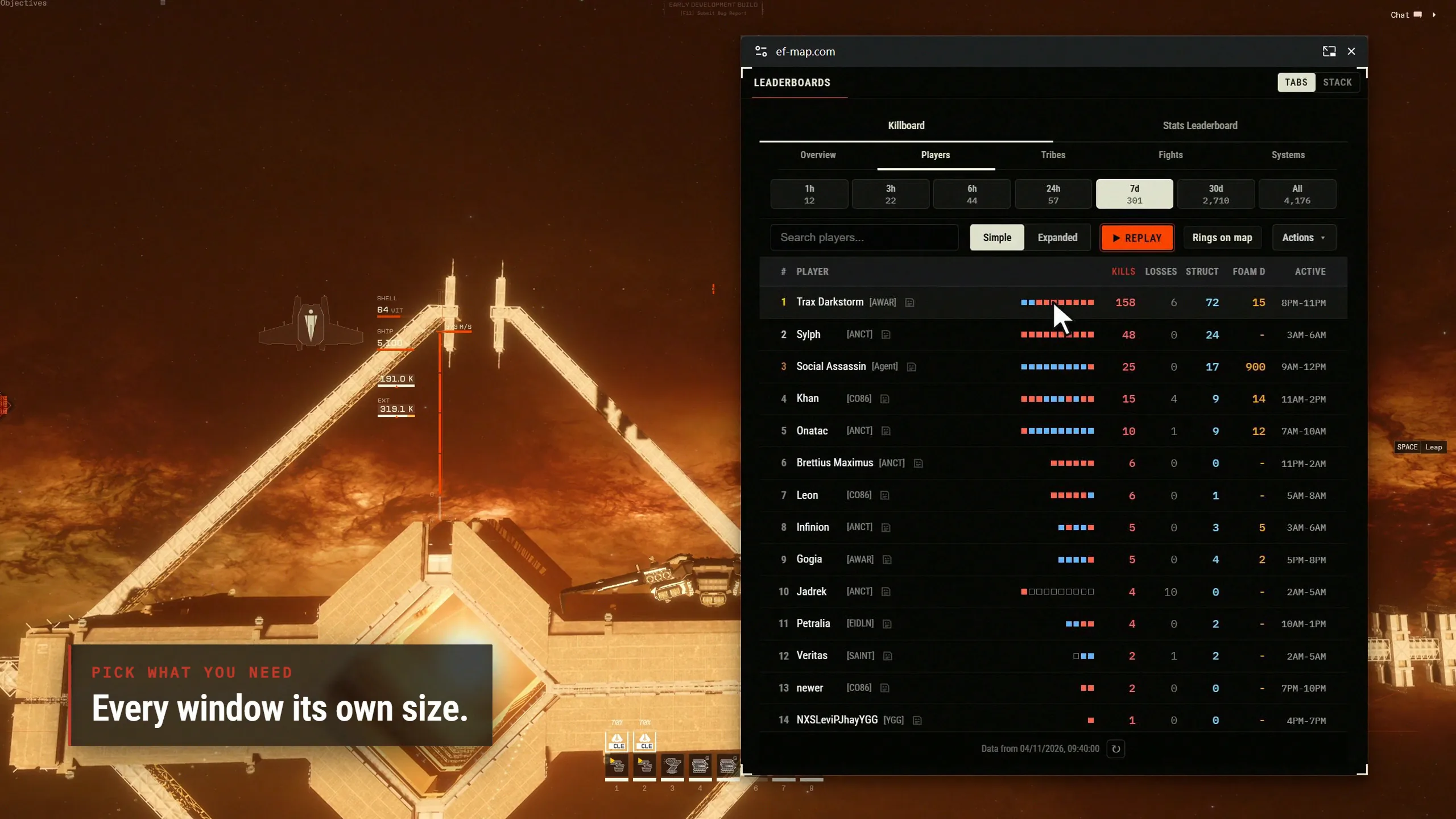
The report found about eight shared building blocks that would paint or listen in the wrong window, which is the sort of thing you want found before you build rather than after. It also recommended starting with three panels and making the Killboard live while we were at it. I turned down both. I asked for every panel that can work on its own rather than three, and the Killboard is a snapshot with a timestamp and a Refresh button on purpose; detaching a panel should change where it is displayed, not what it does, and I didn't want a feature arriving with a side order of surprises. The other call was how several popped panels should live together, and the mock-ups gave me three ways to do that, a stack, tabs or a split. I went with tabs by default and a stack as an option, which I still think was right, although you won't see two panels sharing a window in the video because I decided it muddied the story.
The build
Tuesday night into Wednesday morning was the build, and it was autonomous. I dictated the brief, went to bed, and a Fable 5.1 orchestrator ran it: Opus subagents building in their own worktrees, then two other Opus agents attacking the merged work, one for security and one for lifecycle bugs, with the findings fixed before it went on a preview. I've described that pattern in the Watch view article and I'm not going to repeat it, except to say it is now simply how I ship anything bigger than a bug fix.
What came out the other end is a Pop out button on 35 panels, everything from the Killboard and Route Systems to the EF Helper window, the Item Codex and the Blueprint Calculator, and in Watch view the Frontier feed and the Live Events card pop out too. Twenty panels deliberately don't have it: the minigames, the tools that drive the 3D camera, Cinematic Mode, Creator Mode, Director and so on, because those only make sense attached to the map, plus a few that would break if moved, like the Awakened Cinema player. A popped panel keeps its state, typed text, filters, scroll position, and its link to the map, so selecting a system in the window selects it on the map. Its place on the map shows a slim stub with a Bring back button, and Bring back puts it home exactly as it was. Anything else you pop out joins the window as a tab.
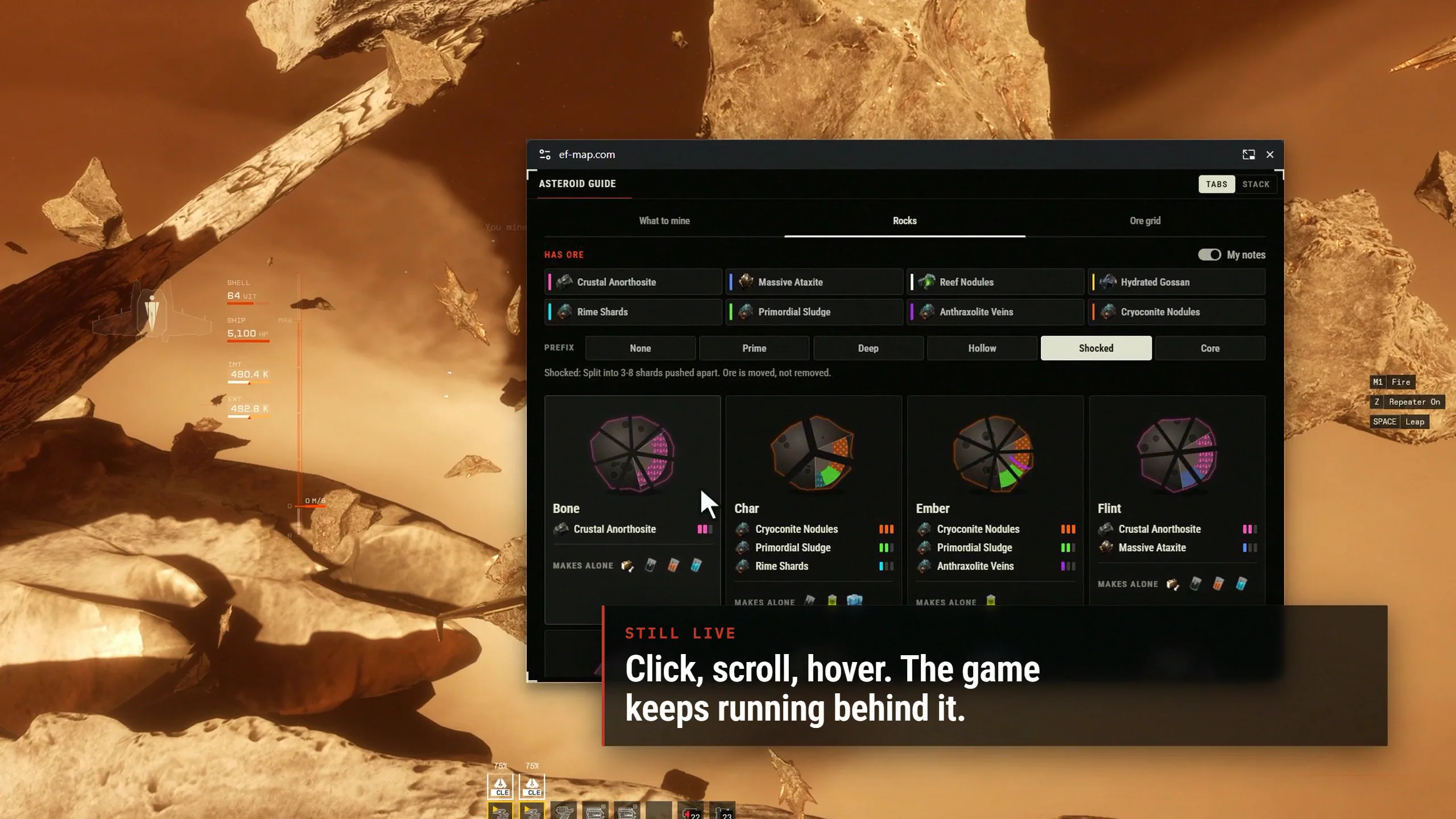
There was one piece of engineering in there I'd call clever, and it wasn't mine. A tab that owns a floating window is exempt from Chrome's background throttling, so the window keeps updating when you alt-tab to the game. The app therefore pauses its own 3D map and the tickers while the EF-Map tab is hidden, and the agents measured it: map frames from 75 a second to zero, renderer CPU from about ten percent to two or three, while a timer inside the popped panel kept ticking. That is the economy a hidden tab has anyway, except the bit you can see keeps going. If you leave EF-Map behind the game all evening with the Killboard floating, that matters.
It was merged and live by Wednesday morning, with landing pages for Pop out and Watch view, a What's new entry, and seven languages. Then I made a video about it, which is a story on its own.
Filming a window that isn't in the page
EF-Map's promo videos are made by an agent-driven pipeline that drives the real site in a headless browser and records the screen at 1440p60. That works because everything it films is inside one page. A Document Picture-in-Picture window is not. It is a second window, with the browser's own title bar, and the screen recorder sees only the page.
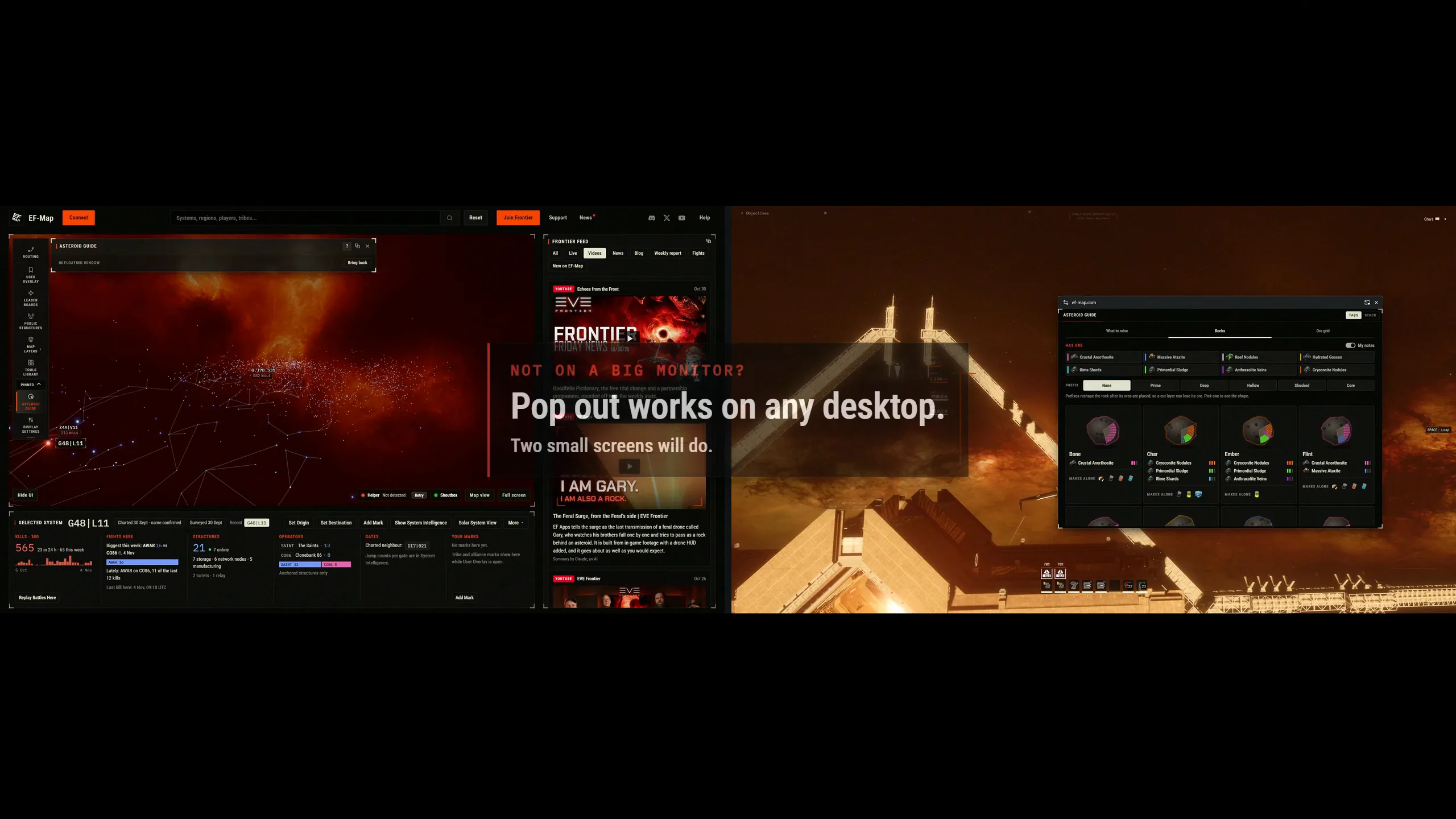
The agent that planned the video ran a probe before writing a line of the plan, and the probe said the floating window is a second page as far as the automation is concerned, and it can be recorded on its own at the same time as the main page. So the pipeline grew two things on the Wednesday: a verb that clicks the real Pop out button, waits for the real window, and films it as a second layer with its own cursor, and a compose step that puts the two recordings on a virtual desk, the map on a monitor on the left, my game footage on a monitor on the right, and moves the window between them under a virtual camera. The title bar on the window in the video is a real still of Chrome's bar, taken off my screen that morning, because headless recording doesn't include browser chrome. The rules I set were that every panel and page is a genuine recording of production and each floating window is a real one filmed as its own layer. What is composed is the desk, the game footage behind the window, the window's movement, its title bar, border, shadow and pointer, and the camera; the window was never over the running game while it filmed. The description under the video says the same, and the one thing in it that isn't real data is the EF Helper window, which runs on a scripted mining session because no helper was running while it filmed.
Two traps from that build are worth writing down for anyone doing the same. Any request interception in the automation tool stalled the floating window's stylesheets, so the window came up unstyled in Times New Roman until the agent moved the routing down to the browser's own debugging protocol. And my remote desktop session capped the headless browser at about 32 frames a second all morning, so every take recorded while I was connected had nearly half its frames held, and the lot had to be re-shot once I was back at the machine. I had the agent write both into the pipeline's gotchas file, which is the point of keeping one.
What it took
Claude Code keeps a transcript of every session, so I had an agent count. Two sessions made this, in three stretches: the feasibility pass on the Tuesday evening and the overnight build in one session, which also planned the video on the Wednesday morning, and the video itself in a second session. The figures are from the logs, deduplicated by request, priced at Anthropic's list prices as if I'd paid per token, which I don't, I pay the subscription. The October article explains that arithmetic.
What the Pop out feature and its video took, from the Claude Code transcripts, two sessions on 3 and 4 November 2026.
| Measure | Figure |
|---|---|
| Sessions | 2 (research, build and the video plan in one; the video in another) |
| Wall clock, first to last log line | 17 hours 46 minutes, across 3 and 4 November |
| Time with at least one agent working | 7.7 hours |
| Summed agent time | 20.4 hours |
| Subagents | 29 (21 Opus 5.5, 8 Sonnet 5.5) |
| Peak agents running at once | 6 |
| Longest unattended stretch | 7 hours 47 minutes overnight; the agents were busy for the first 3 hours 21 minutes of it |
| Model requests | 2,680 |
| Tokens processed | 654 million, 98 percent of them cache reads |
| API equivalent cost | $307: the feature $197, the video $111 |
| Cost by model | Opus 5.5 subagents $179, Fable 5.1 orchestrators $121, Sonnet 5.5 subagents $7 |
| Messages from me | 19 (5 on the feature, 14 on the video) |
| Commits | 73, plus 9 merges |
So the feature itself, the research on the Tuesday evening and the overnight build, came to $197 and ten hours of wall clock, with 22 subagents. That is well under half of what Watch view cost the day before, which fits. Pop out is mostly one change to the shared panel window, plus the shared building blocks, menus, tooltips, dialogs and the clipboard among them, that had to learn there can be two windows, not a new layout with a feed behind it. The overnight stretch is the shape I keep seeing: I said go at 22:23, the orchestrator reported built, tested, reviewed and on a preview at 01:44, having spawned 14 subagents and made 30 commits in the meantime, and then it sat there for four and a half hours until I got up. The work was faster than the sleep.
The video was $111, which is more than I expected until I looked at where it went. About a third of it is the two pipeline additions, filming the floating window as a second layer and the virtual desk, which the next video gets for free. The rest is the part I actually steered: fourteen of my nineteen messages across both sessions were about the video, two briefs, a few questions about the plan and a few rounds of feedback on previews, and that is where the money goes when a human is in the loop. On the feature I sent five.
The usual caveat. $307 is what those tokens would cost on the API; I pay a subscription, and the October article has that arithmetic. The count also misses a few things that leave no usage in the transcripts, the safety checks on each command, the side calls behind web searches, and one context compaction, so treat it as a floor rather than a figure to the dollar.
Where it stands
If you're on Chrome, Edge, Opera or Firefox 151 or later, go and press the button. It's on the title bar of most panels, the window stays above the game in borderless windowed mode, and Bring back undoes it. Exclusive fullscreen hides every normal window including this one, so that is the one mode it can't help with. Safari and other desktop browsers get an ordinary popup window instead, which works but doesn't stay on top. Firefox has the API but I haven't personally verified EF-Map in it yet, so if you try it there I'd like to hear how it went.
The thing I keep coming back to is that question. I've been building EF-Map for over a year, mostly by asking an AI to build things I could describe, and the limit on that has always been what I know to ask for. This time I asked what I didn't know, and a browser feature I'd never heard of turned into the feature I'm most pleased with this cycle, in under a day. I suspect there are more of those. I'll be asking again.
Open EF-Map and try it, and if something doesn't pop out that you think should, let me know and I'll have a look.
Related Posts
- EF-Map Watch View: A YouTube-Style Layout for 1440p Monitors - the Tuesday article; Pop out is its sibling and the feed pops out too
- A Month on Claude Ultra: Where 19 Billion Tokens Went - what the API-equivalent cost means when you pay the subscription
- Dancing Stars With a Point: Inside EF-Map's Agent-Driven Video Pipeline - the pipeline that filmed it, before it knew how to film a second window
- Opus 5.5 Changed How I Use AI Agents, and My Logs Back It Up - why the orchestrator and subagent pattern exists at all